Welcome to the FMT pages.
FMT (Formal Models and Transformations) is a framework for formal models and for transformations between these models.
Models
The following models are supported:
- BPMN 2.0 Choreography Diagrams (BPMN-ChorD)
I/O: bpmn↑BPMN - Choreography Intermediate Format (CIF)
I/O: cif↑CIF, CIF↓cif, CIF↓dot (graphviz files) - Labelled Transition Systems (LTS)
I/O: aut↑LTS (aldebaran files), LTS↓aut, LTS↓dot (graphviz files) - Petri Nets (PN)
I/O: pnml↑PNML, PNML↓pnml
- Symbolic Transition Graphs for choreography (STG-Chor)
I/O: stg↑STG-Chor, STG-Chor↓stg, STG-Chor↓dot (graphviz files)
legend: f↑X: reader (read X from f), X↓f: writer (write X to f), X→Y: transformation
Ongoing work: see issues and enhancements.
Transformations
The following transformations are supported:
- BPMN-ChorD→CIF
transformations.bpmn2cif.Bpmn2Cif(code)
Ongoing work: see issues and enhancements.
Installation
FMT is organized around formal models that are either defined within FMT or, when possible, by encapsulating
existing model libraries.
This means that:
- to use FMT you will need to install any model library that you plan to use;
- to compile FMT you will need to install all model libraries that FMT supports.
Important: the distribution is relative to the master branch.
For features that are not in the master branch you will have to use git to clone or fork FMT.
Installation (source)
The distribution is available as a .tar.gz
archive
and as a .zip archive.
It is also possible to clone the FMT repository as follows:
$ git clone https://github.com/pascalpoizat/fmt.gitIf you have a GitHub account, please consider forking FMT on GitHub.
The distribution includes also a jar file with the compiled sources. Still, if you want to compile the
sources yourself, the simplest is to use your favorite IDE.
Important: you will need to have installed the dependencies to compile
the sources.
Installation (binary)
The distribution includes the compiled sources as a single jar file, fmt.jar, in directory
archive.
Dependencies
To compile FMT, or to have it running, you will need a Java distribution.
BPMN Choreography Diagrams (BPMN-ChorD)
required if you plan to work with BPMN choreography models:- EMF 2.11.0+, BPMN model 1.2.0.Final
You can get EMF by installing Eclipse Mars or above.
You can get the BPMN model by updating your Eclipse IDE using the BPMN update site.
Choreography Intermediate Format (CIF)
required if you plan to work with CIF choreography models:- nothing
Labelled Transition Systems (LTS)
required if you plan to work with LTS models:- nothing
Petri Nets (PN)
required if you plan to work with Petri Net models:- PNML framework 2.2.8+
You can get the PNML framework using one of these techniques:
- update your Eclipse IDE using the PNML framework update site;
- download the archive of jar files from the PNML framework Web site;
Symbolic Transition Graphs for choreography (STG-Chor)
required if you plan to work with STG choreography models:- EMF 2.9.1+, SChorA, Z3
You can get EMF by installing Eclipse.
You can get SChorA at the SChorA GitHub repository.
Unless you want to compile from sources, the archive/schora.jar file includes the necessary SMT-API dependencies (smt-api.jar).
You can get Z3 at http://z3.codeplex.com/
(scroll down the main page to find the Platform section where you can find archives for Windows, Linux, and OSX).
Usage (models, readers, and writers)
We give here an example based on the STG-Chor model.
Other models, readers, and writers, should respect the same coding pattern (see adding models), hence be used in the same way.
Make a working directory
$ mkdir fmt-tests ; cd fmt-tests
Get the sample STG
choreography file and save it in
fmt-tests
We will write a small program to make a copy of this file (this is just for demonstration purposes) and to generate a picture for the model.
Save the following Java source code (you may get it there) as CopyPaste.java.
import models.base.AbstractModel;
import models.base.IllegalResourceException;
import models.choreography.stg.*;
import java.io.File;
import java.io.IOException;

public class CopyPaste {
    public static void main(String[] args) {
        try {
            // read the input model using an stg/STG reader
            AbstractModel model = new StgModel();
            model.setResource(new File("sample.stg"));
            model.modelFromFile(new StgStgReader());

            // write the model using an STG/stg writer
            model.setResource(new File("sample_copy.stg"));
            model.modelToFile(new StgStgWriter());

            // write the model using an STG/dot writer
            model.setResource(new File("sample_copy.dot"));
            model.modelToFile(new DotStgWriter());

        } catch (IllegalResourceException e) {
            System.out.println(e.getMessage());
        } catch (IOException e) {
            System.out.println(e.getMessage());
        }
    }
}
Set up the place where the FMT jar is installed (here the /tmp directory).
$ export FMT_HOME=/tmp
Compile the code
$ javac -cp $FMT_HOME/fmt.jar CopyPaste.javaSet up the place where the dependencies are installed (here the /tmp directory for the SChorA jar and the Eclipse plugins directory for the EMF jars.
$ export SCHORA_HOME=/tmp
$ export EMF_HOME=/Applications/Eclipse/plugins
Run the program
$ java -cp $FMT_HOME/fmt.jar:$SCHORA_HOME/schora.jar:$EMF_HOME/*:. CopyPasteIf you have graphviz installed, you can generate a png file for the model with
$ dot -Tpng sample_copy.dot -o sample_copy.png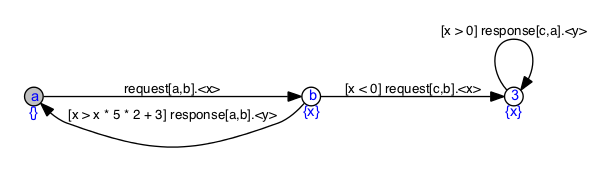
Usage (transformations)
We give here an example based on the BPMN-ChorD→CIF transformation.
Other transformation should respect the same coding pattern (see adding transformations), hence be used in the same way.
Make a working directory
$ mkdir fmt-tests ; cd fmt-tests
Get the sample BPMN
choreography file and save it in
fmt-tests
Set up the places where the FMT jar file and the dependencies are installed (here the /tmp directory
and the Eclipse
plugin directory).
$ export FMT_HOME=/tmp
$ export EMF_HOME=/Applications/Eclipse/plugins
Run a transformer on the sample file.
$ java -cp $FMT_HOME/fmt.jar:$EMF_HOME/*:. transformations.bpmn2cif.Bpmn2Cif sample.bpmn sample.cif
You should then get something like this:
bpmn2cif 1.1
Input model: /private/tmp/comanche.bpmn
-- reader: class models.choreography.bpmn.BpmnEMFBpmnReader (bpmn suffix)
Output model: /private/tmp/comanche.cif
-- writer: class models.choreography.cif.CifCifWriter (cif suffix)
** Resources set
** Input model loaded
** Transformation achieved
** Output model generated
Adding new transformations
Adding a transformation between X and Y is done by
writing:
- a
transformations.x2y.X2YTransformerclass that extendsAbstractTransformer(code) and implements three methods:
public X2YTransformer(); // calls super() public void transform() throws IllegalModelException; // generates outputModel from inputModel public void about(); // prints out NAME + VERSION - a
transformations.x2y.X2Yclass with the following pattern:
package transformations.bpmn2cif;
import ...
public class Bpmn2Cif {
    public static final String USAGE = "Bpmn2Cif input_file output_file";

    public static void main(String[] args) {
        Transformer trans = new Bpmn2CifTransformer();
        trans.setVerbose(true);
        trans.about();
        if (args.length != 2) {
            trans.error(USAGE);
            return;
        }
        try {
            AbstractModelReader reader = new BpmnEMFBpmnReader();
            AbstractModelWriter writer = new CifCifWriter();
            AbstractModel input_model = new BpmnModel();
            input_model.setResource(new File(args[0]));
            AbstractModel output_model = new CifModel();
            output_model.setResource(new File(args[1]));
            trans.setResources(input_model, output_model, reader, writer);
            trans.run(false);
            trans.cleanUp();
        } catch (IOException | IllegalResourceException | IllegalModelException e) {
            trans.message(e.getMessage());
            e.printStackTrace();
        }
    }
}
Support and contribution
Support and contribution can be achieved through the issue
tracker.
If you cannot use GitHub, see contact information here.
License
Code released under the GPL v2.